
Box Menu – free, simple, small, responsive.
Multi-level dropdown website menu. Only pure JavaScript and CSS.
Place Box Menu in multiple places on one webpage.
Menu provides keyboard use and possibility of freezing part of menu structure.
Navigation in menu:
TAB or SHIFT + TAB to move focus “box” through menu positions (right, left). ENTER key on node with submenu causes lock.
It’s possible to use mouse to lock expanded branch of menu like by using ENTER key.
Boxmenu is free for any use – personal, educational and commercial. See license.
Download Box Menu v.1.9.3
Installation / configuration
Everything what is need is to add javascript and css styles.
Load files to your site localisation (for example in “box_menu” directory) and add this lines to your page file:
<link rel="stylesheet" href="box_menu/styles/box_menu.css">
<script src="box_menu/js/box_menu.js"></script>
Next add class “container-box-menu” to container.
<nav class=”container-box-menu”> or e.g. <div role=”navigation” class=”container-box-menu”> for accessibility and class “box-menu” for ul tag.
<nav class="container-box-menu">
  <ul class="box-menu">
    <li>
      <a href="#"> level 1 link_1 next line </a>
    </li>
  </ul>
</nav>
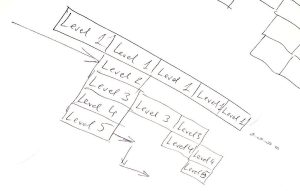
Example of multi-level menu:
<nav class="container-box-menu">

  <ul class="box-menu">

    <li>
      <a href="#"> level 1 link_1 </a>
    </li>

    <li>
      <a href="#"> level 1 link_2 </a>

      <ul>
        <li>
          <a href="#"> level 2 link_1 </a>

          <ul>
            <li>
              <a href="#"> level 3 link_3_1 </a>
            </li>
            <li>
              <a href="#"> level 3 link_3_2 </a>

              <ul>
                <li>
                  <a href="#"> level 4 link_4_1 </a>
                </li>
                <li>
                  <a href="#"> level 4 link_4_2 </a>

                  <ul>
                    <li>
                      <a href="#"> level 5 link_5_1 </a>
                    </li>
                    <li>
                      <a href="#"> level 5 link_5_2 </a>
                    </li>
                    <li>
                      <a href="#"> level 5 link_5_3 </a>

                      <ul>
                        <li>
                          <a href="#"> level 6 link_6_1 </a>
                        </li>
                        <li>
                          <a href="#"> level 6 link_6_2 </a>
                        </li>
                        <li>
                          <a href="#"> level 6 link_6_3 </a>
                        </li>
                      </ul>

                    </li>
                  </ul>

                </li>
                <li>
                  <a href="#"> level 4 link_4_3 </a>
                </li>
              </ul>

            </li>
            <li>
              <a href="#"> level 3 link_3_3 </a>
            </li>
          </ul>

        </li>
        <li>
          <a href="#"> level 2 link_2 </a>

          <ul>
            <li>
              <a href="#"> level 3 link_3_1 </a>
            </li>
            <li>
              <a href="#"> level 3 link_3_2 </a>
            </li>
            <li>
              <a href="#"> level 3 link_3_3 </a>
            </li>
          </ul>

        </li>
        <li>
          <a href="#"> level 2 link_3 </a>
        </li>
      </ul>

    </li>

    <li>
      <a href="#"> level 1 link_3 </a>
    </li>
    <li>
      <a href="#"> level 1 link_4 </a>
    </li>
    <li>
      <a href="#"> level 1 link_5 </a>
    </li>

  </ul>

</nav>